Running a LLM on unsupported GPU : a tale for the bravest
Preface
In a burst of determination to hop on the modern train, I decided to run my own LLM model locally.
I quickly realized that my GPU is unsupported by the ROCm technology.
However, thanks to amazing technological improvements, it is still possible to circumvent this to run LLM models on unsupported hardware.
As it happens quite often during researching and/or debugging stuff on the fly, I quickly got myself into an unnecessary rabbit hole and lost several hours for almost nothing, but I still managed to run various medium-sized models (up to four billions parameters) pretty easily.
I am by no mean proficient in AI/LLM (things are moving way too fast for my ever shrinking brain) but I learnt a thing or two and enjoyed the process.
Enjoy !
Stack
Host system
obligatory fastfetch (for nerds)
        _,met$$$$$gg.          anon@ubuntu
     ,g$$$$$$$$$$$$$$$P.       -----------
   ,g$$P""       """Y$$.".     OS: Debian GNU/Linux 13 (trixie) x86_64
  ,$$P'              `$$$.     Host: MS-7C52 (1.0)
',$$P       ,ggs.     `$$b:    Kernel: Linux 6.12.74+deb13+1-amd64
`d$$'     ,$P"'   .    $$$     WM: i3 (X11)
 $$P      d$'     ,    $$P     CPU: AMD Ryzen 5 2600X (12) @ 3.60 GHz
 $$:      $$.   -    ,d$$'     GPU: AMD Radeon RX 570 Series [Discrete]
 $$;      Y$b._   _,d$P'
 Y$$.    `.`"Y$$$$P"'
 `$$b      "-.__
  `Y$$b
   `Y$$.
     `$$b.
       `Y$$b.
         `"Y$b._
             `""""
Back-end
- Ubuntu 24.04.LTS container on Distrobox (so I don’t break my host system with silly stuff).
Front-end (UI)
For those interested, I have provided a quick install & run guide of the UI at the end of the post.
Requirements
- packages :
cmake build-essential rocm-hip-sdk - llama.cpp github repository :
https://github.com/ggerganov/llama.cpp - huggingface cli tool (to download models) :
pip install huggingface_hub - optional yet useful GPU monitoring tool e.g.
amdgpu_topto watch VRAM consumption - a lot of free time
First (bad) surprise : discovering GPU isn’t compatible
As mentioned at the beginning of the post, my GPU (old RX 570) can’t run any LLM model locally due to its incompatibility with ROCm.
ROCm requires a GPU with a gfx908 LLVM target minimum, that corresponds to the AMD Instinct MI100 GPU (the full compatibility matrix will be provided as a source at the end of the blog post).
Mine has a LLVM target being gfx803 ; way way way WAY outdated for this modern technology.
So, what now ? Do we just give up ? Hell no (Should I have ? Maybe).
While doing some more research, I discovered that you can leverage a OpenCL-based library called CLBlast that enables hardware acceleration (through complex linear algebra stuff) on a wide range of GPUs, including older ones not supported by CUDA or ROCm.
This should work perfectly well since llama.cpp has a OpenCL backend via CLBlast !
Armed with determination and hope, I decided to jump right in and set everything up.
Installation
Dependencies
Some packages related to OpenCL need to be installed :
sudo apt install -y \
  opencl-headers \
  ocl-icd-opencl-dev \
  libclblast-dev \
  clinfo
we also need to install the OpenCL runtime for AMD GPUs :
sudo apt install -y mesa-opencl-icd
As it happened to me a bit later in the installation process, you might get some weird OpenSSL path error when building llama-cpp, the packages below fix the error :
sudo apt install pkg-config libssl-dev
Now that all requirements are met, we can move on to choosing and downloading our model.
Choosing a model
As mentioned at the beginning, I know close to nothing to LLM models (I am a simple guy and just use Claude when needed), the only thing I know is parameters number is big == model is big.
I stumbled upon a neat website called FitMyLLM that ranks the best models for your GPU and even tells you how many token per second you can expect ; wonderful !
For my GPU, it recommended I use Qwen 3.5-4B where I should get approximately 45 tokens/s, looks pretty good to me.
I then downloaded it from huggingface under a local directory called models with the following command :
hf download \
 lmstudio-community/Qwen3.5-4B-Q4_K_M.gguf \
  qwen3.5-4B-Q4_K_M.gguf \
  --local-dir ~/models
ls models/
	qwen3.5-4B-Q4_K_M.gguf
Once the model has been downloaded, we can finally try to run it.
Time 2 try : or where the horrors errors began
Building llama-cpp
First we need to configure and build llama-cpp, which is our LLM inference backend :
git clone https://github.com/ggerganov/llama.cpp
cd llama.cpp

# configure the build with an OpenCL backend
cmake -B build -DGGML_OPENCL=ON

# build
cmake --build build --config Release -j$(nproc)
everything should have built correctly up to this point, we can now start the server with llama-server :
./build/bin/llama-server \
  --model ~/models/Qwen3.5-4B-Q4_K_M.gguf \
  --host 0.0.0.0 \
  --port 8080 \
  --n-gpu-layers 99 \
  --ctx-size 4096
(don’t forget to adapt the --model path if you moved it somewhere else).
This is where I found myself to be incredibly lucky because everything was running, I could even query my own model with cURL and it responded !!!
But it has one gotcha and this is why you’re reading this blog post… the GPU was not detected so the CPU was taking all the load – a dead giveaway being my GPU sitting completely cold while my CPU fans were screaming..
Is this… a rabbit hole ??? It indeed is.
As stated above, I quickly realized (through my monitoring tool) that the GPU wasn’t used at all while querying the model.
ggml_opencl: device: 'AMD Radeon RX 570 Series (radeonsi, polaris10, ACO, DRM 3.61, 6.12.74+deb13+1-amd64) (OpenCL 3.0 )'
Unsupported GPU: AMD Radeon RX 570 Series (radeonsi, polaris10, ACO, DRM 3.61, 6.12.74+deb13+1-amd64)
ggml_opencl: drop unsupported device.
drop unsupported device is quite self-explanatory right… maybe the build failed and I needed to do it again !
Spoiler : It didn’t work and I got the same error.
It’s been already over one hour and I was still at the same point, then I thought (spoke to myself like I always do) “what if I make my GPU supported by patching the code directly in the library that handles the checks ?”
So that was my next idea, and in hindsight, I don’t know why did I even do that because there is virtually no reason this should have worked in any way.
Let’s patch some code !
patching ggml-opencl.cpp
Supported GPUs families
My brain, already bored of the rational approach, wanted novelty – which in practice means new ways to fail spectacularly, as you’ll see below.
So I went the naive route: just grep for the “Unsupported GPU” string across the whole llama backend and see which file handles the checks. Turns out it’s all contained in a single file ggml/src/ggml-opencl/ggml-opencl.cpp – part of ggml, a machine learning library also used in Whisper (the speech-to-text thing).
GPUs supported families are handled in a enum type line 87 :
enum GPU_FAMILY {
    ADRENO,
    INTEL,
    UNKNOWN,
};
More on the UNKNOWN later but I thought (first big error) “yeah let’s just add AMD here”
enum GPU_FAMILY {
    ADRENO,
    INTEL,
    UNKNOWN,
    AMD
};
Compatible GPUs check
Line 2963 there is this nice piece of code :
    if (strstr(dev_ctx->device_name.c_str(), "Adreno") ||
        strstr(dev_ctx->device_name.c_str(), "Qualcomm") ||
        strstr(dev_ctx->device_version.c_str(), "Adreno")) {
        backend_ctx->gpu_family = GPU_FAMILY::ADRENO;
        // Usually device version contains the detailed device name
        backend_ctx->adreno_gen = get_adreno_gpu_gen(dev_ctx->device_version.c_str());
        if (backend_ctx->adreno_gen == ADRENO_GPU_GEN::ADRENO_UNKNOWN) {
            backend_ctx->adreno_gen = get_adreno_gpu_gen(dev_ctx->device_name.c_str());
        }

        // Use wave size of 64 for all Adreno GPUs.
        backend_ctx->adreno_wave_size = 64;
    } else if (strstr(dev_ctx->device_name.c_str(), "Intel")) {
        backend_ctx->gpu_family = GPU_FAMILY::INTEL;
    } else {
        GGML_LOG_ERROR("Unsupported GPU: %s\n", dev_ctx->device_name.c_str());
        backend_ctx->gpu_family = GPU_FAMILY::UNKNOWN;
        return nullptr;
    }
First, it checks your GPU’s name and version string to assign it a family from the enum above ; ADRENO, INTEL, or UNKNOWN. If nothing matches, execution stops right there with the infamous drop unsupported device error. That’s the wall I first hit.
But even passing that doesn’t mean you’re home free –> if the build was compiled with GGML_OPENCL_USE_ADRENO_KERNELS, only Adreno GPUs are allowed through, because the OpenCL kernels in this code path are hand-tuned specifically for that architecture and nothing else.
Patching the first check without addressing the second was never going to work, they serve different purposes entirely, a thing I completely overlooked while blindly patching the code.
Here is the code updated with the new logic where any AMD GPU is automatically supported (second and last big error) :
if (strstr(dev_ctx->device_name.c_str(), "Adreno") ||
        strstr(dev_ctx->device_name.c_str(), "Qualcomm") ||
        strstr(dev_ctx->device_version.c_str(), "Adreno")) {
        backend_ctx->gpu_family = GPU_FAMILY::ADRENO;
        // Usually device version contains the detailed device name
        backend_ctx->adreno_gen = get_adreno_gpu_gen(dev_ctx->device_version.c_str());
        if (backend_ctx->adreno_gen == ADRENO_GPU_GEN::ADRENO_UNKNOWN) {
            backend_ctx->adreno_gen = get_adreno_gpu_gen(dev_ctx->device_name.c_str());
        }

        // Use wave size of 64 for all Adreno GPUs.
        backend_ctx->adreno_wave_size = 64;
    } else if (strstr(dev_ctx->device_name.c_str(), "Intel")) {
        backend_ctx->gpu_family = GPU_FAMILY::INTEL;
        // new piece of code to detects AMD GPUs
    } else if (strstr(dev_ctx->device_name.c_str(), "AMD") ||
               strstr(dev_ctx->device_name.c_str(), "Radeon") ||
               strstr(dev_ctx->device_name.c_str(), "radeonsi")) {
        backend_ctx->gpu_family = GPU_FAMILY::AMD;
    } else {
        GGML_LOG_ERROR("Unsupported GPU: %s\n", dev_ctx->device_name.c_str());
        backend_ctx->gpu_family = GPU_FAMILY::UNKNOWN;
        return nullptr;
    }

#ifdef GGML_OPENCL_USE_ADRENO_KERNELS
    if (backend_ctx->gpu_family != GPU_FAMILY::ADRENO) {
        GGML_LOG_ERROR("ggml_opencl: Adreno-specific kernels should not be enabled for non-Adreno GPUs; "
            "run on an Adreno GPU or recompile with CMake option `-DGGML_OPENCL_USE_ADRENO_KERNELS=OFF`\n");
        return nullptr;
    }
with this done, let’s build again !
cmake -B build -DGGML_OPENCL=ON
cmake --build build --config Release -j$(nproc)
what followed amazed me… it built flawlessly !!! is that it ? are we finally done ? can we hop on the modern train now ?
ggml_opencl: device: 'AMD Radeon RX 570 Series (radeonsi, polaris10, ACO, DRM 3.61, 6.12.74+deb13+1-amd64) (OpenCL 3.0 )'
ggml_opencl: Adreno-specific kernels should not be enabled for non-Adreno GPUs; run on an Adreno GPU or recompile with CMake option `-DGGML_OPENCL_USE_ADRENO_KERNELS=OFF`
ggml_opencl: drop unsupported device.
warning: no usable GPU found, --gpu-layers option will be ignored
warning: one possible reason is that llama.cpp was compiled without GPU support
absolutely not.
At this point three hours flew by, CPU was still taking all the load, I was about to give up and just continue to burn claude tokens, until…
Vulkan to the rescue
Driven by a severe lack of sanity and the unwillingness to give up, I remembered something…
Vulkan exists ??? And works pretty well ??? Should I try ??? (I did).

So i asked my best friend (Google) to see if such a thing exists and oh my there is a DGGML_VULKAN=ON switch ; god bless cmake.
But first we need some packages :
sudo apt install vulkan-tools glslc libvulkan-dev
As a sanity check we verify if the GPU is detected correctly :
vulkaninfo | grep "GPU id"
		GPU id = 0 (AMD Radeon RX 570 Series (RADV POLARIS10))
		GPU id = 1 (llvmpipe (LLVM 20.1.2, 256 bits))
		GPU id = 0 (AMD Radeon RX 570 Series (RADV POLARIS10))
		GPU id = 1 (llvmpipe (LLVM 20.1.2, 256 bits))
		GPU id = 0 (AMD Radeon RX 570 Series (RADV POLARIS10))
		GPU id = 1 (llvmpipe (LLVM 20.1.2, 256 bits))
GPU id : 0 (AMD Radeon RX 570 Series (RADV POLARIS10)):
GPU id : 1 (llvmpipe (LLVM 20.1.2, 256 bits)):
Everything looks good, let’s try again :
# vulkan is my new friend now
cmake -B build -DGGML_VULKAN=ON

# Build
cmake --build build --config Release -j$(nproc)
We start llama-server, and then…
./build/bin/llama-server --model ~/models/qwen3.5-4B-Q4_K_M.gguf --host 0.0.0.0 --port 8000 --n-gpu-layers 99 --ctx-size 4096
ggml_vulkan: Found 1 Vulkan devices:
ggml_vulkan: 0 = AMD Radeon RX 570 Series (RADV POLARIS10) (radv) | uma: 0 | fp16: 0 | bf16: 0 | warp size: 64 | shared memory: 65536 | int dot: 0 | matrix cores: none
main: n_parallel is set to auto, using n_parallel = 4 and kv_unified = true
build: 8465 (568aec82d) with GNU 13.3.0 for Linux x86_64
system info: n_threads = 6, n_threads_batch = 6, total_threads = 12
oh. my. god.
At this point I don’t know if i was happy because it is finally working or angry because I could have thought about Vulkan and not lose five hours on this.
Now the final test was to make a simple query and watch the GPU VRAM consumption skyrocket.
So what best to ask besides if malwares are cool ?

Never trust the clankers.
Meanwhile, the GPU VRAM consumption :
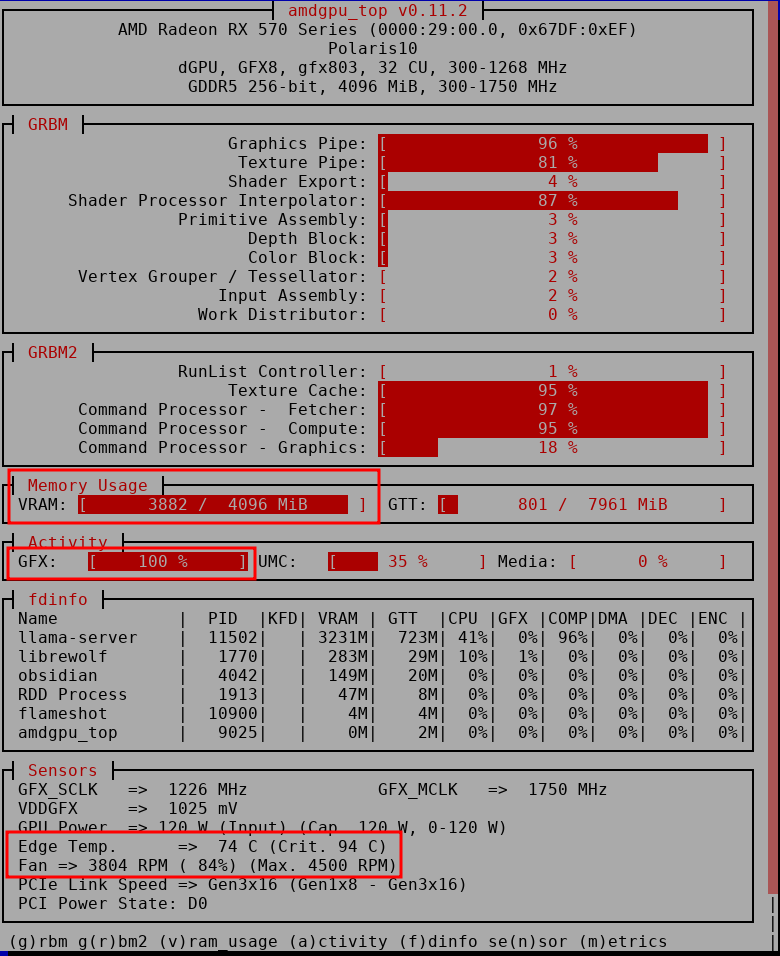
We can clearly see that the GPU is (FINALLY) used at its maximum capacity, it can perfectly run a 4 billion parameters model at 40/50 tokens/s !
Open-WebUI
For ease of use I run my models through the Open-WebUI frontend. It can be installed as follows :
pip install open-webui
then started with
open-webui serve
your frontend will be available on port 8080
Here is a quick and dirty bash script I wrote to start both the llama-server and the frontend :
#!/bin/bash
MODEL=~/models/qwen3.5-4B-Q4_K_M.gguf
LLAMA_SERVER=~/llama.cpp/build/bin/llama-server

echo "Starting llama-server..."
$LLAMA_SERVER \
  --model $MODEL \
  --host 0.0.0.0 \
  --port 8000 \
  --n-gpu-layers 99 \
  --ctx-size 4096 &

LLAMA_PID=$!
echo "llama-server started (PID: $LLAMA_PID)"

# start first llama-server then webui
echo "Waiting for llama-server to be ready..."
until curl -s http://localhost:8000/v1/models > /dev/null; do
  sleep 1
done

echo "Starting Open WebUI..."
open-webui serve &

WEBUI_PID=$!
echo "Open WebUI started (PID: $WEBUI_PID)"

echo ""
echo "All services running!"
echo "  llama-server : http://localhost:8000"
echo "  Open WebUI   : http://localhost:8080"
echo ""

# kill both processes when ctrl-c is detected
trap "echo 'Stopping...'; kill $LLAMA_PID $WEBUI_PID; exit 0" SIGINT SIGTERM
wait
Again, don’t forget to adapt both the model & llama-server paths at the beginning of the script, if need be.
You can now enjoy running local LLM on your unsupported hardware too !
tldr
Use -DGGML_VULKAN=ON if OpenCL won’t detect your GPU.
As said in a series of tweets I’ve done after celebrating my win
“buy a better gpu bro stop being poor”
but I am a ““““hacker”””” so let’s have some fun and waste a couple of precious hours of my life instead !
the end
I hope you enjoyed my passion of overcomplicating things that should not be over complicated. I had a lot of fun and will definitely use it more to see what it can really do (without burning out my poor little GPU).
If you want to try this as well and need help, you can shoot me a DM on Twitter at @societynotreal, I would love to help and/or chat !
As said above i could have done that in way way less hours but i ended up having a lot of fun (yes, really) and learned new things along the way about LLM and OpenCL/ML library internals (if i could say so).
If you made it until here thank you, until next time with even funnier adventures I hope.